What is MCP? A plain-English guide for people who don't code
4 min readBy Fezola
Short answer: MCP, the Model Context Protocol, is an open standard that lets AI applications such as Claude or ChatGPT connect to outside data, tools and workflows. Think of it as a USB-C port for AI: one standard plug, instead of a different cable for every app. Everything below follows the official MCP documentation, read on 9 November 2026.
The problem MCP solves
An AI assistant on its own knows what it was trained on and what you type. It cannot see your calendar, read your files or check your email unless something connects it. Before MCP, each connection needed its own custom work, one per app and per assistant. MCP replaces that with a shared language: a service describes what it offers once, and any assistant that speaks MCP can use it.
The USB-C analogy
The official introduction compares MCP to a USB-C port: a standard way to connect electronic devices, so you do not need one cable per gadget. MCP does the same job between AI applications and the outside world. The plug is the standard, the device is the service, and the assistant is the computer.
Who is who
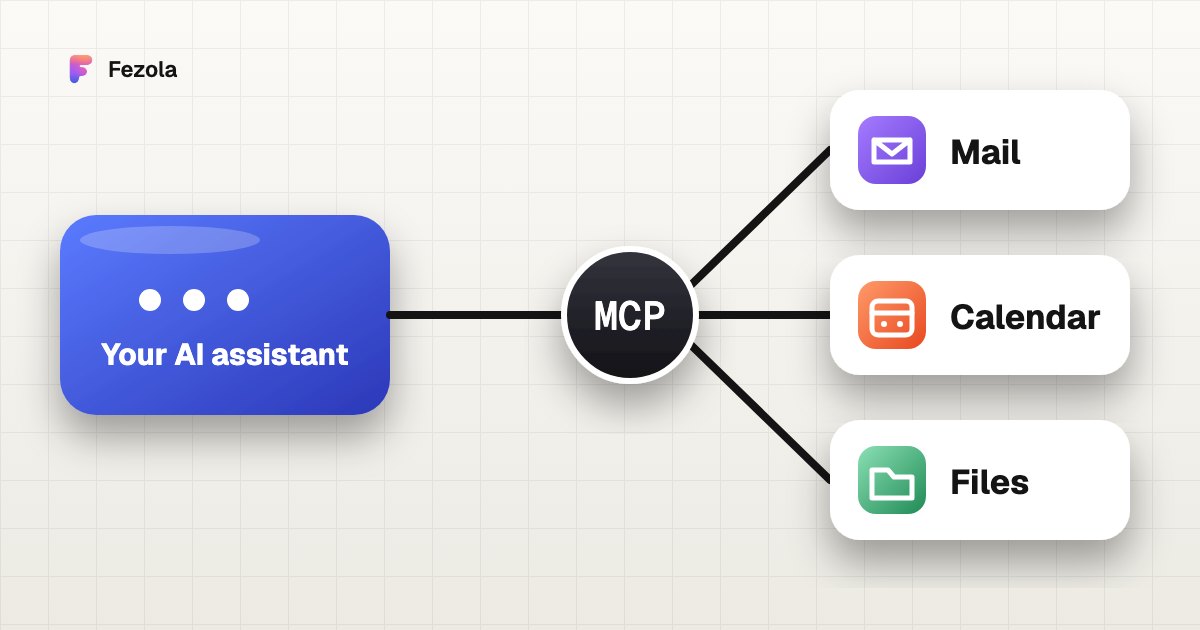
MCP has three roles, and you rarely need more than the first:
- The host: the AI application you use, for example Claude or ChatGPT. It manages the connections.
- The client: a part inside the host that holds one connection to one server.
- The server: the program that provides the context, whether a mailbox, a calendar or a file store.
"Server" does not mean something scary. It simply names the program that serves the data, wherever it runs.
What can a server offer?
The documentation names three kinds of things a server can expose:
- Tools: actions the assistant can run, such as searching your mailbox or creating a draft.
- Resources: data the assistant can read, such as the contents of a file or a database record.
- Prompts: ready-made templates that help structure a request.
The assistant decides when to use a tool, and a well-built connector tells you before it does something that changes your data.
What does it look like in practice?
Connect an email server and you can ask: "What did my accountant send me this week?" The assistant calls a search tool, reads the results and answers from your real messages. Connect a calendar server and it can check your availability. The same pattern works for files, databases and design tools. Our article what is an email MCP server shows this with a mailbox.
Local or hosted?
MCP supports two ways to connect:
- Local (stdio): the server runs on your own computer, started by the application. It usually serves one application and nothing leaves your machine except what the server itself sends.
- Remote (Streamable HTTP): the server runs on a provider's infrastructure and serves many users. This is what you use from the web version of an assistant, with a URL. MCP recommends OAuth to sign in, so you approve access on a consent screen and never hand over your password to the assistant.
What to check before you plug something in
- What can it read? One mailbox or everything? Which scope did you approve?
- Can it write or send? A connector that only prepares drafts is safer than one that can send on its own.
- Who runs it? Anthropic, for example, does not verify custom connectors and advises connecting only servers you trust.
- Can you remove it? Look for the disconnect or revoke option before you connect.
- Remember prompt injection. Content the assistant reads, like an email, can contain instructions aimed at the model, which is one more reason to prefer read-only or draft-only tools. See is it safe to connect your email to an AI?.
Which assistants support MCP?
The official site lists AI assistants such as Claude and ChatGPT, and development tools such as Visual Studio Code and Cursor. Support depends on your plan: in ChatGPT, custom MCP servers are available on Business and Enterprise/Edu plans (Pro read-only), while Claude accepts custom connectors on all plans, with one on the Free plan. See how to add a custom connector to Claude and how to add an MCP server to ChatGPT.
One example among others
Fezola is one MCP connector: it brings Gmail, iCloud, any IMAP mailbox, Google Chat and Telegram into Claude behind one URL, https://api.fezola.com/mcp, and saves drafts by default (direct sending is opt-in per mailbox). It is free for 2 sources. Other connectors cover other tools: best email MCP servers compares the options for email.
Questions
What does MCP stand for?
MCP stands for Model Context Protocol. It is an open-source standard for connecting AI applications to external systems such as data sources, tools and workflows.
Is MCP only for developers?
No. Developers build MCP servers, but as a user you only add a connector, usually by pasting a URL and signing in. Assistants such as Claude and ChatGPT support MCP, though availability depends on the plan.
What is the difference between MCP and an API?
An API is how one program talks to one service, in that service's own way. MCP is a common way for AI applications to talk to many services, so an assistant can use a new tool without a custom integration for each one.
Is MCP safe?
It depends on the server you connect and the permissions you give it. Check what it can read, whether it can write or send, who runs it, and how you remove access. Treat content it reads, such as an email, as untrusted input.
What is the difference between a local and a hosted MCP server?
A local server runs on your own computer and usually serves one application. A hosted (remote) server runs on a provider's infrastructure, can serve many users, and typically asks you to sign in with OAuth.
Can I try MCP with my email?
Yes. Fezola is an example: a hosted MCP connector for mailboxes, Google Chat and Telegram. It is free for 2 sources, and Pro connects up to 20 sources for $9 per month or $90 per year, with a 7-day free trial.
Connect your first inbox in two minutes
Free with 2 sources, no card needed. Nothing to install.
Start for freeKeep reading
· 3 min read
Outlook.com and Hotmail now work in Claude (and ChatGPT on Business plans) with Fezola
Connect an Outlook.com, Hotmail or Live mailbox to Claude (and ChatGPT on Business plans) in one click with Sign in with Microsoft: no password, no IMAP setting, drafts only by default.
Read the article
· 6 min read
Gmail MCP server for Claude (and ChatGPT Business): official, open source or hosted
Three ways to connect Gmail to Claude through MCP: the built-in connector, Google's own server, or a hosted one. What each can do, what it costs you, honest limits.
Read the article
· 6 min read
Best email MCP servers for Claude (and ChatGPT Business) in November 2026
An honest comparison of email MCP servers for Claude, and for ChatGPT on Business plans: built-in connectors, self-hosted and hosted options, with their limits.
Read the article
IMAP MCP server: connect any mailbox to Claude (and ChatGPT Business)
OVH, IONOS, Gandi, Fastmail or a mailbox on your own domain, in Claude (and ChatGPT Business), with nothing to install.
Read the guide
How to bring all your inboxes and chats into Claude (or ChatGPT Business)
Gmail, iCloud, your own domain over IMAP, Google Chat and Telegram, searchable together through one connector.
Read the guide